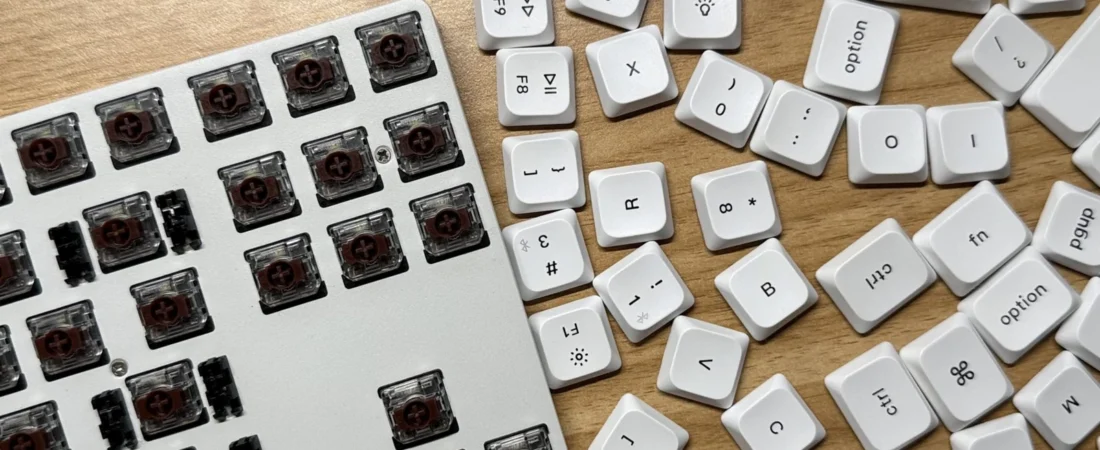
A hot-swappable keyboard allows compatible switches to be removed and installed without soldering. That makes experimentation and switch replacement easier. It does not make a keyboard high quality by itself.
A nearly complete r/keyboards thread asked whether it was sensible to buy an inexpensive hot-swap board and upgrade it later. The replies identified the hidden decision: the case, plate, stabilizers, socket type, layout, firmware, keycaps, switches, and wireless system all contribute to the final board. Replacing switches cannot fix every weakness in the base product.
Quick answer
Hot swap is worth paying for when the buyer expects to try different mechanical switches, wants easier repair of a failed switch, or has not yet learned which feel and sound are preferred. It is less important when the board already has the desired switches, the buyer never plans to open it, or the price premium forces a compromise on layout, software, stabilizers, or build quality.
| Question | Why it matters |
|---|---|
| Which switch type fits? | Mechanical MX-style, low-profile, optical, and Hall-effect systems are not universally interchangeable |
| 3-pin or 5-pin? | A socket or plate may require clipping plastic alignment pins on some switches |
| Is the layout standard? | Unusual key sizes make replacement keycap sets harder to buy |
| Does the board software work? | Switch replacement does not fix poor remapping, macros, or operating-system support |
| What is the total upgrade cost? | Switches, keycaps, tools, shipping, and spare parts can exceed a better prebuilt board |
| What does the warranty allow? | Bent sockets or case opening may not be covered |
What hot swap actually changes
On a soldered mechanical keyboard, each switch is electrically attached to the circuit board. Changing a switch normally requires desoldering and soldering. A hot-swap socket accepts a compatible switch pin mechanically, making replacement possible with a switch puller.
That gives beginners three practical benefits:
- try another switch without buying a whole keyboard;
- replace one failed switch more easily;
- tune different keys for different functions where compatibility allows.
The socket is still a component that can be damaged. A bent switch pin, misaligned insertion, excessive force, or unsupported switch type can push a socket away from the circuit board.
Compatibility is the first buying test
“Hot-swappable” is incomplete without the socket standard. Common questions include:
- Does it accept MX-style mechanical switches?
- Does it accept both 3-pin and 5-pin housings?
- Is it limited to a specific low-profile family?
- Is it an optical board that needs matching optical switches?
- Is it a Hall-effect board with magnetic switches and model-specific firmware?
- Is the LED orientation compatible with the switch housing and keycaps?
- Does the plate support the switch dimensions?
Mechanical, optical, and magnetic Hall-effect switches solve different sensing problems. A hot-swap label on all three does not make the switches cross-compatible. Check the exact model manual and support page before ordering a switch set.
The base keyboard still matters
Switches influence force, travel, smoothness, and sound, but the board contributes:
- case rigidity and resonance;
- plate material and mounting style;
- stabilizer quality on Space, Enter, Shift, and Backspace;
- internal cavity and damping;
- PCB reliability;
- key scanning and latency;
- firmware, remapping, macros, and layers;
- wireless connection and battery;
- layout and keycap sizes;
- warranty and parts support.
A hollow or rattling board may improve with careful modification, but a switch swap is not a guarantee. A beautiful switch cannot add a missing navigation key or repair unreliable Bluetooth.
Cheap now, expensive later
Build a total-cost list before choosing an upgrade path:
- base keyboard;
- full switch quantity plus several spares;
- replacement keycaps compatible with the layout;
- switch and keycap pullers;
- stabilizer or lubricant supplies if genuinely needed;
- shipping and import costs;
- time and the risk of damaging a socket;
- the unused stock switches and caps.
A low-cost board plus premium switches and keycaps can cost more than a better board that already has an acceptable configuration. The upgrade route is valuable when learning and customization are part of the goal, not only when it appears cheaper.
Buy a switch sample before a full set
Online sound tests are strongly shaped by the case, plate, keycaps, desk, microphone, room, and recording processing. Use them to learn vocabulary, not to predict the exact result.
A small switch sample can compare force and feel, but a loose switch tester does not reproduce the full keyboard. If possible, test several switches in the actual hot-swap board before buying enough for every key. Remember that the spacebar and stabilized keys will sound different from letters.
Beginner installation checklist
- Disconnect the keyboard and follow the manual.
- Photograph the layout before removing keycaps.
- Pull keycaps straight up with an appropriate tool.
- Support the board on a stable surface.
- Remove switches with the correct puller and release tabs evenly.
- Inspect new switch pins for bends.
- Align the pins and housing before applying pressure.
- Stop if the switch does not seat normally.
- Test every key before fully reassembling.
- Keep spare switches and the original parts labeled.
Do not force incompatible switches or open areas the manufacturer says are not user-serviceable.
When hot swap is not worth the premium
Skip the feature when:
- the exact preferred switch is already soldered into a reliable board;
- the board is for a managed workplace where modifications are not permitted;
- spill resistance or sealed construction matters more;
- the buyer needs a specialized layout unavailable in a good hot-swap model;
- the added cost removes budget from a better case, warranty, or software support;
- the buyer has no interest in changing or repairing switches.
Buying checklist
- Verify the exact socket and switch family.
- Confirm 3-pin and 5-pin support.
- Check layout and replacement keycap sizes.
- Review firmware and operating-system compatibility.
- Inspect stabilizer and wireless reviews separately from switch reviews.
- Price the complete upgrade path.
- Check included pullers and spare switches.
- Read warranty terms for socket damage and case opening.
- Prefer a seller with clear support and replacement parts.
Final recommendation
For a first mechanical keyboard, hot swap is a useful form of flexibility. It reduces the cost and skill required to change compatible switches and can make a single failed switch easier to replace. Pay for it only after confirming the socket standard and the quality of the board around the sockets. Hot swap buys options; it does not buy a finished result.
Related Buyer Voice Lab guides
Sources and research scope
- Public r/keyboards discussion about buying a cheap hot-swap board and upgrading later. Reddit displayed 14 comments; 13 visible comment elements were reviewed.
- Keychron: Difference Between Optical and Mechanical Switches as one manufacturer explanation of incompatible sensing systems.
- QMK Firmware Documentation for firmware and remapping background; hardware support remains model-specific.
Compatibility varies by exact keyboard revision. Verify the manufacturer documentation before buying switches or keycaps.
Featured image: “Low-profile mechanical keyboard with brown switches and keycaps being removed on a table.” by Shusei Toda, licensed under CC0 1.0. Original source. Cropped to 16:9.